|

Man can live about forty days without food...
About three days without
water...
About eight minutes without air...
But only for one second without
hope.
Hal
Lindsey
|
|
|
|
|
Schedule Online
Now
4 Calendar quick
link
- See Available
Appointment
Times - New Clients
- Current
Clients
4 Log
In
quick
link
-
To Make an
Appointment - Cancel Session
-
Re-Schedule
- To
check Your Next
Appointment time and
date
Detailed instructions and
information are
listed
below.
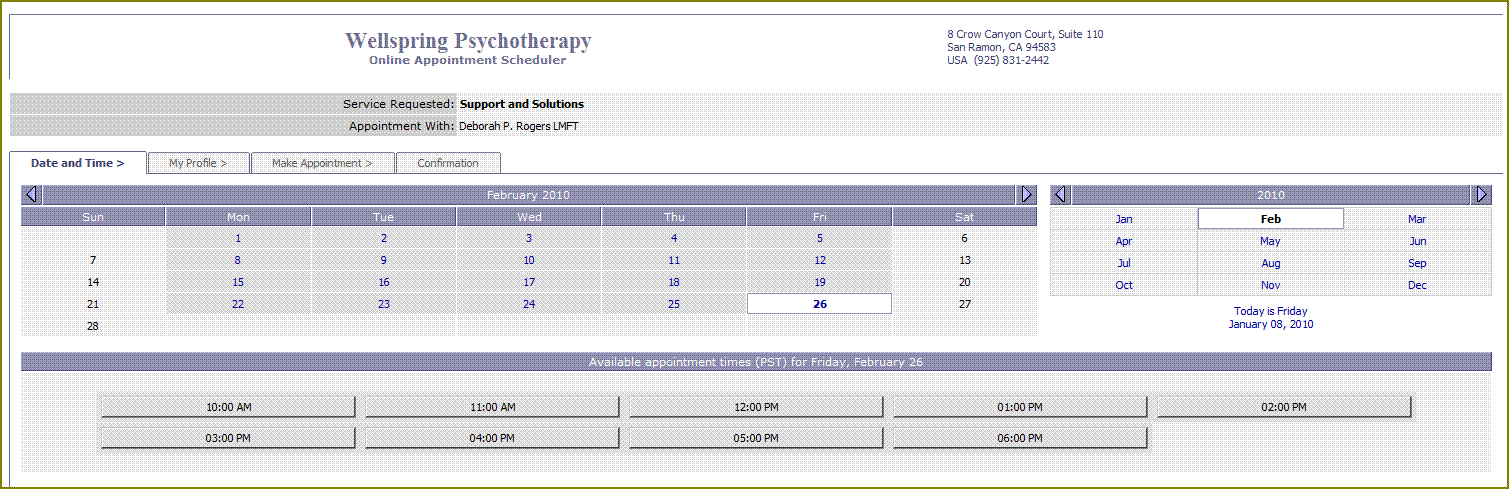
Take a few moments to check out our
helpful
Online
Appointment
Calendar
and
see
how
easy
it
is
to verify
when
your
next
session
is,
check
your
appointment
status,
see
what
appointments
are
available,
schedule
a
new
session
or
cancel
an
existing
appointment
and
re-schedule.
All
of
the
submitted
contact
information,
as
well
as the
scheduling
process,
is
done
through
an
encrypted
and
confidential
online
connection,
with
each
client
only
having
access to
their
own
account information
by
using
a
password.
Available Appointment
Times
.
.
.
.
.
.
.
.
.
.
.
.
.
.
. . . .
.
.
.
.
.
.
.
.
.
.
.
.
.
.
.
. . .
.

Now with our Online Calendar you can
easily
find
out
if
we
have
any
openings
that
will
fit
your
schedule.
If
you
don't
happen
to
see
any
times
online
that
fit,
then
give
us
a
call
and
we
might
have
something
that is
due
to
open
up
and
it
just
isn't on
the
calendar
yet.
1.
Click
here
to
view
our
Online
Calendar
2. Select a
day
that
you
would
like
to
check
for
available
times.
Additional
Selections
From
the
Calendar
screen,
you
will
have
the
opportunity
to
make
the
following
selections,
if
you
would
like
to
continue
further:
Make
an
Appointment
-
Select
and
schedule
a
session.
My
Calendar
-
Shows
your
appointment
on
specific
days
that
you
select.
My
Appointments
-
Lists
all
of
your
appointments
and
the
appointment
status
of
each.
My
Profile
-
Your
current
contact
information.
Make
an
Appointment.
.
.
.
.
.
.
.
.
.
.
.
.
.
. . . . . . .
.
.
.
.
.
.
.
.
.
.
.
.
.
.
.
. . . . . . .
.
Simply check our
Online
Calendar
for
available
appointments.
To
allow
enough
time
for the
review-&-confirmation
process
of
your
appointment
request,
a
minimum
of
two
days
advanced
notice
is
required.
1st
Time
Scheduling
Online
Sessions
1.
Click
here
to
view
our
Online
Calendar
2.
Select
a
day
that
you
would
like
to
schedule
and
check
for available
times.
3. Enroll
as
a
"New
Client",
give
your
name
and
contact information.
4. Select a
time
that
is
listed
as
open,
5.
Click
"Make
an
Appointment".
A helpful
reminder
email
notice will be
sent
to
you
before
any
appointments
that
you
have
scheduled
online.
Important Note
Your
reserved
appointment
time
will
have
the
status
of
"Pending
Confirmation"
until
it
has
been
reviewed
and
accepted
by
our
office.
You
will
receive
an
email notice
either
confirming
or
denying
your
requested
appointment.
Once
you
receive
a
confirmation
notice,
then
you
have
secured
your
appointment
and
are
financially
contracted
to
submit
payment
for your
reserved
time
unless
our
office
receives
a
24-hour
advanced
notice
of
cancellation.

TOP
New Clients .
.
.
.
.
.
.
.
.
.
.
.
.
.
.
.
. . . . . . . . . . . . .
.
.
.
.
.
.
.
.
.
.
.
.
.
.
.
. . . . . . .
As you look for a
new
therapist,
it
can
frequently
become
time
consuming
having
to
call
around
leaving
phone
messages
in
order
to
determine
who
might have
appointments
available.
Now
with
our
Online
Calendar,
you
can
easily
find
out
if
we
have
any
openings
that
will
fit
your
schedule.
If
you
don't
happen
to
see
any
times
online
that
fit,
then
give
us
a
call
and
we
might
have
something
that is
due
to
open
up
and
it
just
isn't on
the
calendar
yet.
1st Time Scheduling Online
Sessions
1.
Click
here
to
view
our
Online
Calendar
2. Select a day that you
would
like
to
schedule.and
check
for available
times.
3.
Register
as
a
"New
Client",
give
your
name
and
contact information.
4.
Select a
time
that
is
listed
as
open
5.
Click
"Make
an
Appointment"
4
Phone contact is
required
prior
to accepting
your
initial
reservation so
we
can
discuss
your
questions,
your
needs and
to
determine
if
our
services
will
fit
well
with your
needs.
In
most
cases,
we
can
connect
by
phone
the
same
day
that
you
are inquiring
about making
an
appointment.
Please
Provide
This
Insurance
Information
1.
Name
of
your
insurance
company
2.
Name
of
the policy
holder and
their
date
of
birth
3.
The
ID
number
from
your
insurance
card
or
your
social
security
number
4.
Names
and
dates
of
birth
of
each
person
who
will
be
attending
sessions
5.
Authorization
number
(if
applicable) and
number
of
sessions
allowed
6. Your
main
topics
of
concern
A helpful
reminder
email
notice will be
sent
to
you
before
any
appointments
that
you
have
scheduled
online.
Important
Note
Your reserved
appointment
time
will
have
the
status
of
"Pending
Confirmation"
until
it
has
been
reviewed
and
accepted
by
our
office.
You will
receive
an
email notice
either
confirming
or
denying
your
requested
appointment.
Once you receive a
confirmation
notice,
then
you
have
secured
your
appointment
and
are
financially
contracted
to
submit
payment
for your
reserved
time
unless
our
office
receives
a
24-hour
advanced
notice
of
cancellation.
Current
Clients
.
.
.
.
.
.
.
.
. .
.
.
. .
.
.
.
.
.
.
.
.
.
.
.
.
.
.
.
.
. . . . . . . . . . . . . . .
. .
. .
Save time by
avoiding that
irritating
phone
tag
process! Quickly
find
out
when
your
next
appointment
is,
schedule,
cancel
and
re-schedule
an
appointment.
.
Already
Registered
User
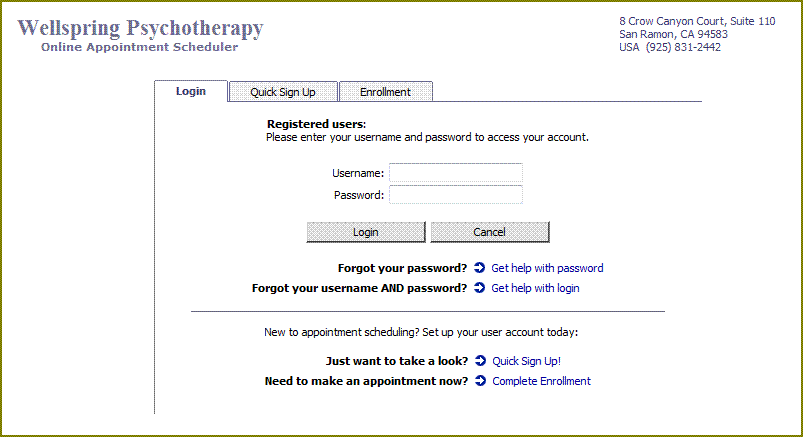
1.
Click
here
to
Log In
to
our
Online
Appointment
Scheduler
2.
Select
a
day
that
you
would
like
to
schedule.and
check
for available
times.
3. Select
a time
that
is
listed
as
open
4. Click
"Make
an
Appointment".
1st Time
Scheduling
Online
Sessions
1.
Click
here
to
view
our
Online
Calendar
2. Select a day that you would
like
to
schedule
and
check
for available
times.
3.
Register
as
a
"New
Client",
give
your
name
and
contact information.
4.
Select
a time
that
is
listed
as
open
5. Click
"Make
an
Appointment".
A helpful
reminder
email
notice will be
sent
to
you
before
all
appointments
that
you
have
scheduled
online.
Important
Note
Your
reserved
appointment
time
will
have the
status
of
"Pending
Confirmation"
until
it
has
been
reviewed
and
accepted
by
our
office.
You
will
receive
an
email notice
either
confirming
or
denying
your
requested
appointment.
Once
you
receive
a
confirmation
notice,
then
you
have
secured
your
appointment
and
are
financially
contracted
to
submit
payment
for your
reserved
time
unless
our
office
receives
a
24-hour
advanced
notice
of
cancellation.
TOP
Re-Scheduling . . . . . . . . . . . . .
.
.
.
.
.
.
.
.
.
.
.
.
.
.
.
. . . . . . . . . . . . .
.
.
.
.
.
. .
. .
With our Online
Appointment
Scheduler,
you
don't
have
to
wait
for regular
office
hours
to
roll
around
when
you
need
to
make
a
change
with
your
scheduled
sessions. Simply
check
our
Calendar
to
see
what
appointments
are
available
and
submit
your
request
for different appointment.
Part
1
-
Cancel
Existing
Appointment
1.
Click
here
to
Log In to our online
appointment
scheduler.
2.
Go
to
"My
Appointments"
and
select
the
appointment
you
wish to
cancel.
3. Select
"Cancel
Appointment".
Part
2
-
Schedule
New
Appointment
1.
Go
to
"My
Calendar".
2.
Select
a
day
that
you
would
like
to
re-schedule.and
check
for available
times.
3. Select
a time
that
is
listed
as
open
4. Click
"Make
an
Appointment".
A helpful
reminder
email
notice will be
sent
to
you
before
any
appointments
that
you
have
scheduled
online.
Important
Note
Your
reserved
appointment
time
will
have the
status
of
"Pending
Confirmation"
until
it
has
been
reviewed
and
accepted
by
our
office.
You
will
receive
an
email notice
either
confirming
or
denying
your
requested
appointment.
Once
you
receive
a
confirmation
notice,
then
you
have
secured
your
appointment
and
are
financially
contracted
to
submit
payment
for your
reserved
time
unless
our
office
receives
a
24-hour
advanced
notice
of
cancellation.
Cancel Appointments . . . . . . . . . .
.
.
.
.
.
.
.
.
.
.
.
.
.
.
.
. . . . . . . . . . . . . . .
. .
. .
It only takes a moment to
let
our
office
know
that
you
need
to
cancel
an
appointment.
Here's
the
online process.
By
Internet
1.
Click
here
to
Log In to our appointment
scheduler.
2.
Go
to
"My
Appointments".
3.
Select
the
appointment
you
wish
to
cancel
4. Click
"Cancel
Appointment".
By
Phone
Call
our
office
to
specify
which
session
you
would
like
to
cancel.
Even
if
you
miss
the
24-hour
advance
notice
deadline
for
canceling,
please
call
anyway
so
someone
on
the
waiting
list
can
use
your
appointment
time.
Important
Note
Once
you
have
an
appointment
scheduled
and
confirmed,
you
are
financially contracted
to
submit
payment
for your
reserved
time
unless
our
office
receives
a
24-hour
advanced
notice
of
cancellation.
TOP
Note:
The use of this web site or
email
link
does
not
in
any
way imply
a patient-therapist
relationship.
| |
|
|
Payment Methods |
|
4
Schedule Online
Now
3
No
More
Phone
Tag!
*
Meetings are in the
office
with
masks
and
distancing.
*
Personal
Check
Receipt
provided
for
insurance
Private
Pay Patients
For maximum
confidentiality
and
treatment
options,
use private
pay.
None of your personal
treatment information
is
required by
insurance
and
you
are free
to
decide
your
own course of
therapy to
best
meet
your
needs.
Bring a check
and
have
that
ready
at
the
beginning
of
each
session.
A
receipt
can
be
given
if you would like to submit that to
your
insurance
for
reimbursement.
In-Network Patients
Bring a check for the
full
fee with
your
first
session, and have that ready at
the
beginning
of
the
appointment. The amount will be
adjusted
after
your
insurance
has determined their coverage
amount.
After
providing
your insurance
ID
and
date
of
birth,
our office verifies your benefits
and your
appointment
will
be
confirmed.
Please contact
your
insurance
to
determine
your
copay
and
if
an authorization is required.
Note that insurance requires
clinical
information
about
you
and imposes
limitations on
your
treatment.
Out-of-Network Patients
Receive reimbursement directly from
your
insurance by
submitting
the receipt
provided
by
our
office. Please contact
your
insurance
for details
about
your
coverage.
Bring a check and have that ready
at
the
beginning
of
each
session.
We have helpful submission
tips,
office
receipts
for patients
who use
their
insurance
out-of-network.
Monthly
Payments
Individuals
and
families
with
very
busy
schedules
sometimes use
a
monthly payment
schedule
to
streamline
the
process
even
further.
24-Hour
Cancellation
Your appointments are very important and they
require
a full
24-Hour
notice
in
order
to
release
your
financial
obligation.
If
you
use
insurance,
please
note
that
they
will
not
cover missed
sessions
or
late
cancellations.
These
remain
your
financial
obligation.
Call our office to determine which
billing
method
will
work
best
for you.
Contact
Us
- About
Us
925
831-2442
4 Schedule Online Now 3
|

Knowing others is
wisdom.
Knowing yourself is
Enlightenment.
Lao-tzu
|